1. Core Concepts
Vulcan Forge API
  • Introduction
  • Getting Started
  • Authentication & Authorization
  • Core Concepts
    • Terminology
    • Regulated Assets
    • Tenants
    • Mapping & Labelling
    • SVM Networks
    • Transaction Processing
    • Key Management
    • Read Layer
    • Webhooks
  • API Reference
    • Blockchain Accounts
      • Create Account
      • Fetch Account Details
      • Fetch Account Private Key
      • Fetch Account Balance
      • Fetch Accounts
      • Update Account
      • Inactivate Account
    • Financial Instruments
      • Create Financial Instrument
      • Fetch Financial Instrument Details
      • Fetch Financial Instrument Circulating Supply
      • Fetch Financial Instruments
      • Update Financial Instrument
      • Close Financial Instrument
      • Pause Financial Instrument
      • Unpause Financial Instrument
      • Token Extensions Calculator
    • Positions
      • State
        • Initialize Position
        • Update Position
        • Inactivate Position
        • Freeze Position
        • Unfreeze Position
      • Movements
        • Mint
        • Burn
        • Transfer Financial Instrument
        • Transfer Network Currency
      • Trades
        • Trade
      • History
        • Fetch Position Details
        • Fetch Position Balance
        • Fetch Positions
    • Loans
      • Create Loan
      • Fetch Loan Details
      • Fetch Loans
      • Swap Collateral
      • Repay Loan
      • Close Loan
      • Refinance Loan
    • Market Data
      • Onchain Data Sources
        • Create Onchain Data Source
        • Update Oracle Data Source Definition
        • Refresh Oracle Data Source
        • Fetch Onchain Data Source Details
        • Fetch Oracle Data Sources
    • Blockchain Transactions
      • Processing
        • Fetch Transaction Status
        • Sign Transaction
        • Submit Transaction
      • Durable Nonces
        • Create Durable Nonce Accounts
        • Fetch Durable Nonce Account Details
        • Fetch Durable Nonce Accounts
      • Address Lookup Tables
        • Create Address Lookup Table
        • Fetch Address Lookup Table Details
        • Fetch Address Lookup Tables
        • Extend Address Lookup Table
        • Update Address Lookup Table
      • History
        • Fetch Transaction Details
        • Fetch Transactions
  • Schemas
    • Accounts
      • DKG
        • DKG Key Setup
      • Max Allowed Debit Config
      • Webhook Config
      • Offchain References
      • Account Lookup
      • New Account
      • Tenancy Config
      • Offchain File
      • Network Currency Debit Limit Config
      • Token Debit Limit Config
      • Limit Duration
    • Market Data
      • Onchain Data Source Details
      • Switchboard Data Source Details
    • Webhook Payloads
      • Pre Transaction Submit Webhook
      • Post Transaction Submit Webhook
    • Transactions
      • Svm Value Input
      • Svm Transaction Config
      • Commitment Config
      • Transaction Lookup
    • Query
      • Query Components
        • Sort Model
        • Filter Model
        • Field Value Filter
      • Items Query
      • Bulk Query
    • Loans
      • Loan Duration
    • Reponses
      • Errors
        • Individual Error
        • Error Response
      • Accounts
        • Private Keys
          • Database Private Key Details
          • Private Key Details
          • Cloud Provider Resource Location
          • DKG Private Key Details
        • Account Response Detailed
        • Account Onchain Detailed
        • Account Offchain Detailed
        • Account Response Compact
        • Account Onchain Compact
        • Account Offchain Compact
        • Account Response Identifiers
      • Transactions
        • Svm Value Result
        • Transaction Response Detailed
        • Transaction Account Info
        • Value Balances
        • Transaction Instruction Response
        • Transaction Account Identifiers
        • Svm Transaction Result
        • Svm Entity Result
      • Financial Instruments
        • Financial Instrument Detailed
        • Financial Instrument Compact
        • Financial Instrument Identifiers
      • Loans
        • Loan Response
      • Positions
        • Position Offchain Result
        • Position Balance Response
        • Position Response Detailed
        • Position Response Compact
        • Position Response Identifiers
      • Market Data
        • Onchain Data Source Response
    • Positions
      • Position Lookup
      • Mint Definition
      • Burn Definition
      • Transfer Financial Instrument Definition
      • Transfer Network Currency Definition
  1. Core Concepts

Webhooks

TLDR#

Vulcan Forge allows for end-to-end automations with external systems at both stages of processing an SVM transaction: before and after submitting the transaction to the blockchain.

Transaction Processing Stages and Webhooks#

Vulcan Forge supports the setup of 3 types of webhooks.

1. Missing Signature Webhooks#

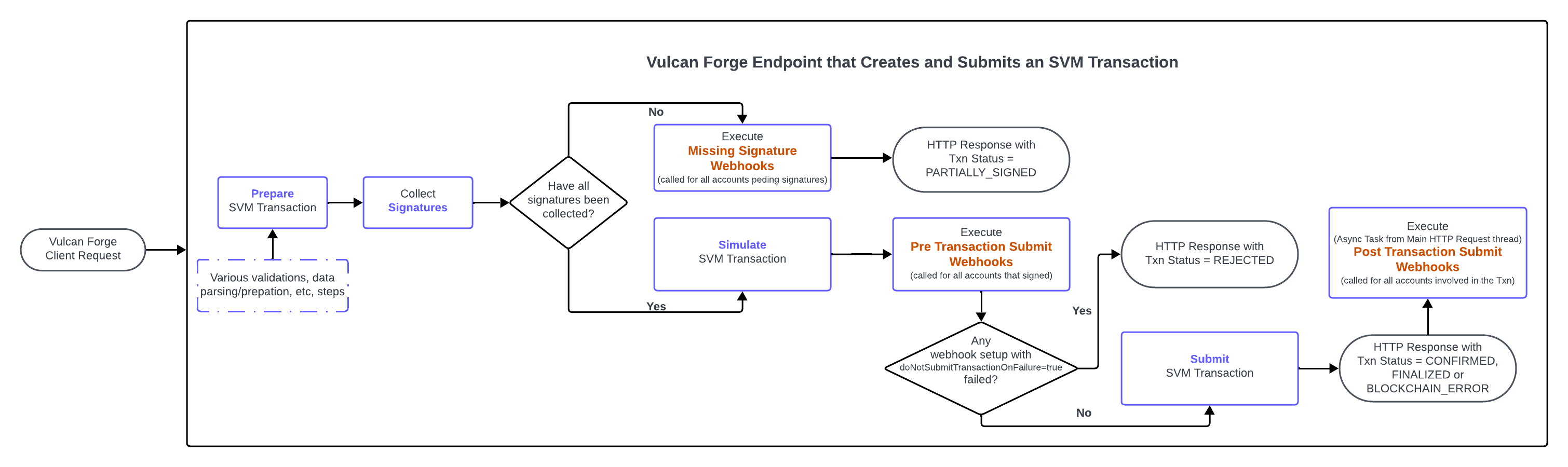
Webhooks executed for all blockchain accounts for which signatures cannot be collected at the time an SVM transaction is prepared.
These webhooks can be used for automating the offline signing flow. Receiving systems can automate the follow-on completion of the transaction processing flow by calling the Sign Transaction endpoint once all conditions have been met that allow the receiver to either:
generate signature(s) on its side and submit it to Vulcan Forge to attach to the transaction OR
let the system generate the signatures if the accounts (for which the signatures are missing) are setup as a managed account in Vulcan Forge, and the caller has access to them.
Configuration Endpoints
Create Blockchain Account
Update Blockchain Account

2. Pre Transaction Submit Webhooks#

Webhooks executed for all blockchain accounts that signed an SVM transaction. The execution of these webhooks occurs after the transaction is simulated and before it is submitted to the SVM network.
This is the only type of webhooks which can stop the processing flow. See the webhook configuration section for more details. Thus they can be used as a mechanism to enforce policies validations.
Configuration Endpoints
Create Blockchain Account
Update Blockchain Account

3. Post Transaction Submit Webhooks#

Webhooks executed for all blockchain accounts involved an SVM transaction. The execution of these webhooks occurs after the transaction is submitted to the blockchain.
Configuration Endpoints
Create Blockchain Account
Update Blockchain Account
Create Financial Instrument
Update Financial Instrument
Initialize Position
Update Position

Webhooks processing flow#

This diagram illustrates at which point each set of webhooks will be executed at:

Webhook Configuration#

The schema for a webhook configuration can be found here.

External Validations#

Vulcan Forge clients can choose to use the preTransactionSubmitWebhooks not just as a notification mechanism but also as a way to implement custom validations/policies. If these validations / policies do not complete successfully, if the Pre Transaction Submit webhook is setup with doNotSubmitTransactionOnFailure=true, this results in the whole transaction being rejected. This applies if at least 1 such webhook fails.

Authentication#

The webhook endpoints have to be configured with one (and only one) of the following authentication mechanisms:
1.
API Key Authentication
See the apiKeyAuthConfig field in the webhook config schema for more details.
2.
OAuth2 Authentication
See the oauth2AuthConfig field in the webhook config schema for more details.
The following OAuth2 authentication flows are supported:
PASSWORD
CLIENT_CREDENTIALS

Performance Considerations#

The system executes the webhooks applicable for each stage in parallel. It records the start time of the execution call and the end time for it (if the the webhook endpoint returns within the max allowed timeout).

Webhook timeouts#

The system implements a default timeout (reflected in the default value for the timeout field in the webhook config schema). This means that once the timeout is reached, the system gives up on waiting for a response from the webhook. If the webhook responds within the allowed timeout, its HTTP Response Code is also logged.
The execution time for the webhook is especially important for the Pre Transaction Submit webhooks, for these reasons:
their execution sits inside the HTTP request processing pipeline: the longer these webhooks take, the longer the wait to get a response, for the Vulcan Forge client that submitted the request to the endpoint that creates the SVM transaction.
For transactions submitted with a messageLifetimeStrategy=RECENT_BLOCKHASH the system has a very short amount of time between when the blockhash is timestamped in the transaction at the Prepare stage and the moment the transaction is submitted/lands to the network for processing.
if the webhook is setup with doNotSubmitTransactionOnFailure=true, if the webhook does not return within the allowed timeout, the system considers this scenario as a failure.
As such, it is important for these webhooks to be fast and reliable.
It is important to note also that if the system detects that some of the configs across the entire set of webhooks that has to be executed share the same endpointUrl, the system will only execute these webhooks once, per each distinct endpointUrl.

Validations: Performance Optimization#

If the logic for implementing external validation policies is more involved, a performance optimization can be considered where the logic is split over up to 3 different webhooks (the max allowed # of webhook configs allowed per account & type of webhook). These webhooks are then executed in parallel and if either of them fails, the transaction will be rejected.

Favor API Key Authentication#

Webhooks setup OAuth2 for authentication have a handicap in terms of total execution time: instead of the needing to execute just 1 HTTP request to the webhook endpoint, the system needs to execute an additional HTTP request (before the webhook endpointUrl is hit) in order to fetch a bearer token from the OAuth2 provider.
As such, especially for Pre Transaction Submit webhooks, it is recommended to use API Key authentication.
The system stores in its offchain database, these authentication credentials in encrypted format. And at the time an endpoint does its processing, the credentials are read and decrypted on the fly before webhook executions.

Webhook payloads#

The payload provided to the webhooks provides all the transaction information available at the time the webhook is called.
As such, the payloads are different depending on the execution stage:
1.
Transaction Payloads w/ PRE Submit Transaction information. Sent to:
Missing Signature Webhooks
Pre Transaction Submit Webhooks
2.
Transaction Payloads w/ POST Submit Transaction information. Sent to:
Post Transaction Submit Webhooks
Modified at 2026-04-05 17:58:50

Previous
Read Layer
Next
API Reference
Built with